How to Fix Extra Footer White Space in Kadence
You’ve built your site, everything looks great – and then you scroll to the bottom and see a big strip of white space below your footer. You didn’t put it there. There’s nothing in the Customizer that says “add weird gap at the bottom.” And yet, here it is.
I’ve hit this exact problem more times than I’d like to admit. In about 70% of cases, there’s one specific cause – and it takes 30 seconds to fix.
Here are the 3 things that cause this issue, starting with the most common one.
What causes white space below the Kadence footer?
The mystery gap is almost always one of these 3 things:
- A footer row holding an element that renders nothing – usually an empty widget area
- A plugin injecting hidden content after the footer
- Custom CSS adding margin or padding you forgot about
Here’s how to check each one.
Is a footer row with nothing in it causing the gap?
This is the fix for most people. Here’s why it happens.
First, the good news: Kadence is smarter than most themes about this. Its footer builder has 3 rows – Top, Middle, and Bottom – and a row with no elements in it at all doesn’t render. The theme checks all 5 columns of the row and skips it entirely if every one is empty. So a truly empty row can’t be your problem.
The gap comes from the row that looks empty but isn’t. You dragged a Footer Widget 1 block into the Middle row months ago, never put a widget in that widget area, and forgot about it. Kadence sees an element in the row, so it renders the row – and the row brings its spacing with it. On the Top and Middle rows that’s 30px above and 30px below by default. 60px of blank strip, from an element you can’t see.
Here’s how to check:
- Go to Appearance > Customize > Footer
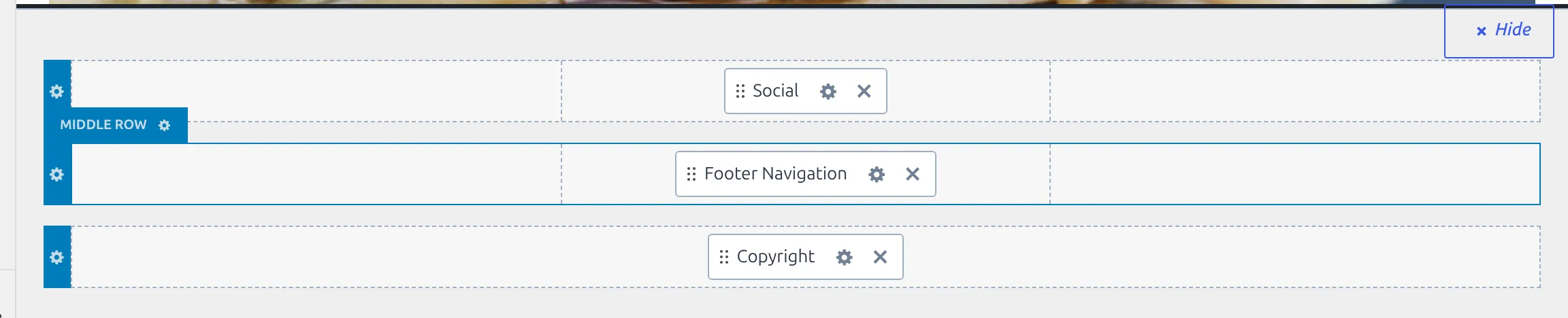
- Kadence docks a visual footer builder under the preview, with the 3 rows stacked – Top Row, Middle Row, Bottom Row
- Look for a row that has a block sitting in it but shows nothing in the preview above
- The usual suspect is a Footer Widget block pointing at a widget area you never filled
The fix: You’ve got two options.
Option A – Drag the element out of the row. Grab the block and drop it back on Available Items. With the row genuinely empty, Kadence stops rendering it and the gap goes with it. This is the cleanest fix.
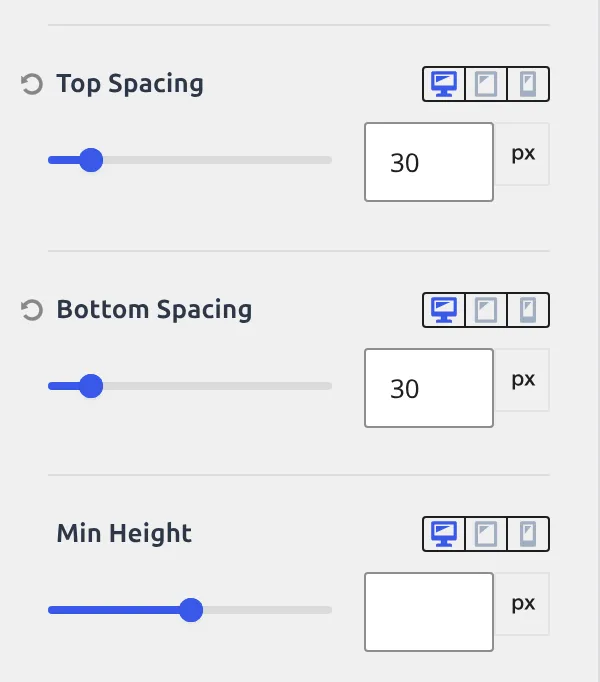
Option B – Zero the row’s spacing. If you want to keep the block for later, click the row to open its section – Footer Middle, say – and on the General tab set Top Spacing and Bottom Spacing to 0. Note the labels: Kadence calls these Spacing, not padding, and they live on the General tab, not Design.
I’d go with Option A. If you need the block later, you can always drag it back. Once you’ve cleaned up the rows, you might want to update the copyright text while you are in there.
Is a plugin injecting hidden content?
If all 3 footer rows look correct, the next suspect is a plugin adding invisible elements below your footer. This is more common than you’d think.
The usual offenders:
- Cookie consent plugins – they often insert an empty container div that takes up space before the actual cookie bar appears
- Chat widgets – loading a wrapper element before the chat bubble is ready
- GDPR/privacy plugins – adding hidden consent containers at the bottom of the page
Here’s how to find them:
- Right-click on the white space below your footer
- Click Inspect (or Inspect Element in some browsers)
- The browser DevTools will open and highlight the element under your cursor
- Look at the HTML – is it a
<div>or<section>that doesn’t belong to the Kadence theme?
If you see something like <div class="cookie-notice-container"> or a similar plugin-generated element, you’ve found it. Go to that plugin’s settings and look for a positioning option. Most let you choose between fixed (floating at the bottom of the screen) and inline (inserted into the page). Switch to fixed, and the white space should disappear.
Quick test: Deactivate plugins one at a time and refresh. When the gap goes away, you’ve found the culprit. Reactivate it and adjust its settings.
Is custom CSS adding extra space?
If you’ve added custom CSS – in Appearance > Customize > Additional CSS or a child theme stylesheet – you might have a rule that’s adding bottom margin or padding without realizing it.
The properties to watch for:
margin-bottomorpadding-bottomonbody,html,#wrapper, or.site- Extra padding on
footeror.site-footer - A
min-heighton the page wrapper that’s pushing the footer up and creating space below it
How to find it:
- Go to Appearance > Customize > Additional CSS
- Select all your custom CSS and cut it (Ctrl+X)
- Click Publish and check your site
- If the white space is gone, paste your CSS back and remove rules one at a time until you find the culprit
Tedious, but faster than staring at 50 lines of CSS trying to guess which rule is the problem.
The CSS emergency fix
If you’ve checked all 3 causes and you’re still stuck, this CSS will force-remove the gap:
.site-footer {
    margin-bottom: 0 !important;
    padding-bottom: 0 !important;
}

.site-footer-row-container-inner {
    padding-top: 0 !important;
    padding-bottom: 0 !important;
}
Add this in Appearance > Customize > Additional CSS.
But treat this as a last resort. You’re hiding the symptom, not fixing the cause. And !important overrides can create headaches later when you try to adjust footer padding intentionally and wonder why nothing changes. If your Customizer changes aren’t sticking after you set padding values, check my guide on fixing Kadence Customizer not saving.
Does the gap only show on mobile?
One more thing to check. Sometimes the white space only appears on phones or only on desktop.
Kadence lets you set a different value for desktop, tablet, and mobile on each footer row. So you might have zero spacing on desktop but 30px still sitting there on mobile.
To check:
- Open Appearance > Customize > Footer
- Click a footer row to open its section – Footer Middle, for example
- Stay on the General tab
- Find Top Spacing and Bottom Spacing. Each one has a small row of device icons above it – desktop, tablet, phone. Click through all 3 to see what’s set at each breakpoint
- Set any unwanted value to
0on the device where you’re seeing the gap
While you’re here, check Min Height too. It sits just below the spacing controls, it’s empty by default, and a value left in it holds the row open no matter how much spacing you strip out.
You can also use the Customizer’s responsive preview (the device icons at the bottom of the panel) to check without pulling out your phone.
Wrapping up
In my experience, the fix almost always turns out to be a footer row still holding one element that renders nothing – usually a widget area nobody ever filled. Drag the block out, the row stops rendering, and the white space vanishes. If that’s not it, check for plugin-injected elements and custom CSS.
And if you found this after spending 20 minutes hunting for a non-existent margin somewhere in your stylesheet – I’ve been there. At least now you know where to look first next time.
Frequently Asked Questions
Why does my Kadence footer have a gap only on certain pages?
Different pages can have different footer behavior if you’re using Kadence’s per-page layout overrides. Check the page in the WordPress editor – open Kadence Page Settings and see if there’s a custom footer setting applied. Also, some page builders inject extra wrapper divs that add spacing only on pages built with that builder.
Can I remove the Kadence footer entirely?
Yes. Go to Appearance > Customize > Footer and drag every element out of all 3 rows onto Available Items. With nothing left in any row, Kadence stops rendering the footer. If you still want copyright text, leave the Footer Copyright HTML block in the Bottom row and clear the other two. To kill the footer on one page only, open that page in the editor, click the Kadence Page Settings pencil, and set Disable Footer.
Does the Kadence footer gap affect my site’s SEO?
The white space itself won’t hurt your SEO rankings. But if it’s caused by hidden plugin-generated elements that contain empty markup, that’s unnecessary DOM bloat. It’s a minor issue, but worth fixing for clean HTML output and a polished user experience.
Will a Kadence theme update fix the footer white space?
Unlikely. The gap is almost always caused by your configuration – a leftover block in a row, plugin conflicts, or custom CSS – not a theme bug. Updating Kadence will not change your footer row settings or remove conflicting CSS you added.