How to Write a Meta Description That Gets Clicks
A meta description is the short pitch under your title in Google. To write one that gets clicks, answer the search in the first sentence, add one concrete benefit, and keep the whole thing to about 120-155 characters. In WordPress you need an SEO plugin to add it, because WordPress itself doesn’t print one.
Google doesn’t always show your description. Two large 2020 studies found it swapped in its own text for 63-71% of results. But when Google does use yours, it’s the only part of the result you fully control.
For this update I installed the 3 SEO plugins I get asked about most (Rank Math, Yoast SEO and SEO Simple Pack) on a test site running WordPress 7.1.2. I checked where each one hides the field and what each prints when you leave it empty. The blank-field results surprised me, and they’re the best argument I know for writing your own.
What Is a Meta Description?
A meta description is a line of HTML in your page’s <head> that summarizes the page. Visitors don’t see it on the page itself. Google may show it as the snippet, the 1-2 lines of grey text under the blue title link.
It doesn’t affect your rankings. Google said so directly back in 2009: “Even though we sometimes use the description meta tag for the snippets we show, we still don’t use the description meta tag in our ranking.”
What it does affect is whether someone picks your result. You’ve already earned the spot on the page. The description is your chance to tell the searcher why your page answers their question better than the other results around it.
How Long Should a Meta Description Be?
Aim for about 120-155 characters, and put the important part in the first 120.
There’s no official limit. Google’s own snippet documentation says “There’s no limit on how long a meta description can be, but the snippet is truncated in Google Search results as needed, typically to fit the device width.” So the cut-off is about screen width in pixels, not a fixed number of characters, and a description full of wide letters gets cut sooner.
That’s why SEO plugins only give you a guide:
- Rank Math counts characters and pixels. Its limit is 160 characters or 920 pixels, shown as “120 / 160 (743px / 920px)” right above the field.
- Yoast SEO shows a coloured bar with no number. In its code the “good” range is 120 to 156 characters.
- SEO Simple Pack shows no counter at all, so I paste the text into a character counter first.
Don’t spend characters on your site name either. Google shows your site name next to your favicon, above the title link, so repeating it in the description only pushes your real selling point toward the cut-off.
How Do I Write One That Gets Clicks?
I use the same 3-part formula for every post on this site.
The Formula: Answer + Benefit + CTA
- Answer the search in the first sentence. If someone searches “Kadence customizer not saving”, tell them straight away that you have the fix.
- Add a benefit – it’s free, it takes 2 minutes, it avoids a common mistake. Give them a reason to click beyond the bare answer.
- End with a nudge – “here’s the fix,” “see the comparison,” “here’s the step-by-step.” This is your call to action (CTA).
You don’t need all 3 every time. But the ones I’m happiest with have at least 2.
Good Examples
These are real meta descriptions running on this site right now, with their length in characters:
For a tested comparison (151 characters):
“I ran LiteSpeed Cache vs WP Super Cache on the same LiteSpeed server. One cached on activation, one needed 2 clicks – and your host decides the winner.”
It answers “which one?” with a real test, gives a specific detail (2 clicks), and teases the verdict without giving it all away. Someone stuck choosing between the 2 caching plugins knows exactly what they’ll get.
For a troubleshooting guide (140 characters):
“Kadence Customizer not saving? I tested the usual fixes on Kadence 1.4.5 – and proved the popular max_input_vars advice doesn’t apply to it.”
This one opens with the searcher’s own problem as a question. Then it promises something the other results don’t: a tested answer that busts the fix every forum repeats. You can see the whole guide on fixing the Kadence Customizer.
For a Kadence tutorial (129 characters):
“I’ll show you how to edit Kadence footer copyright text, remove the theme credit, and add custom links – all free, no Pro needed.”
It names the 3 things the reader will be able to do and answers the question most people have before they click: do I need Kadence Pro? (No. The full steps are in my footer copyright guide.)
Bad Examples (and Why They Fail)
Vague filler intro:
“In this article, we’ll look at the best ways to improve your WordPress site’s performance and speed.”
This says nothing. It doesn’t answer a question, name a tool, or give a reason to click. It’s the meta description version of “please hold while we transfer your call.”
Keyword stuffing:
“WordPress. Speed. Caching. Plugins. Everything you need to know.”
Google’s documentation calls this out by name: descriptions made of long strings of keywords “don’t give users a clear idea of the page’s content.” Searchers read it as spam too.
Too generic:
“Learn about WordPress meta descriptions and how they can help your blog.”
This could describe 10,000 pages. There’s nothing specific, no benefit, and no reason to pick this result over the next one.
Where Do I Add a Meta Description in WordPress?
You add it through an SEO plugin. I checked a fresh WordPress 7.1.2 site with the Kadence theme and no SEO plugin, and its pages had no meta description tag at all. The site tagline doesn’t become one either.
Here’s where the field lives in the 3 plugins I tested, in the block editor.
Rank Math
- Open the post or page you want to edit.
- Click the Rank Math score button in the top toolbar (it shows a score like “9 / 100”). The Rank Math sidebar opens on the right.
- On the General tab, click Edit Snippet under the preview.
- Type your text in the Description field and watch the counter above it.
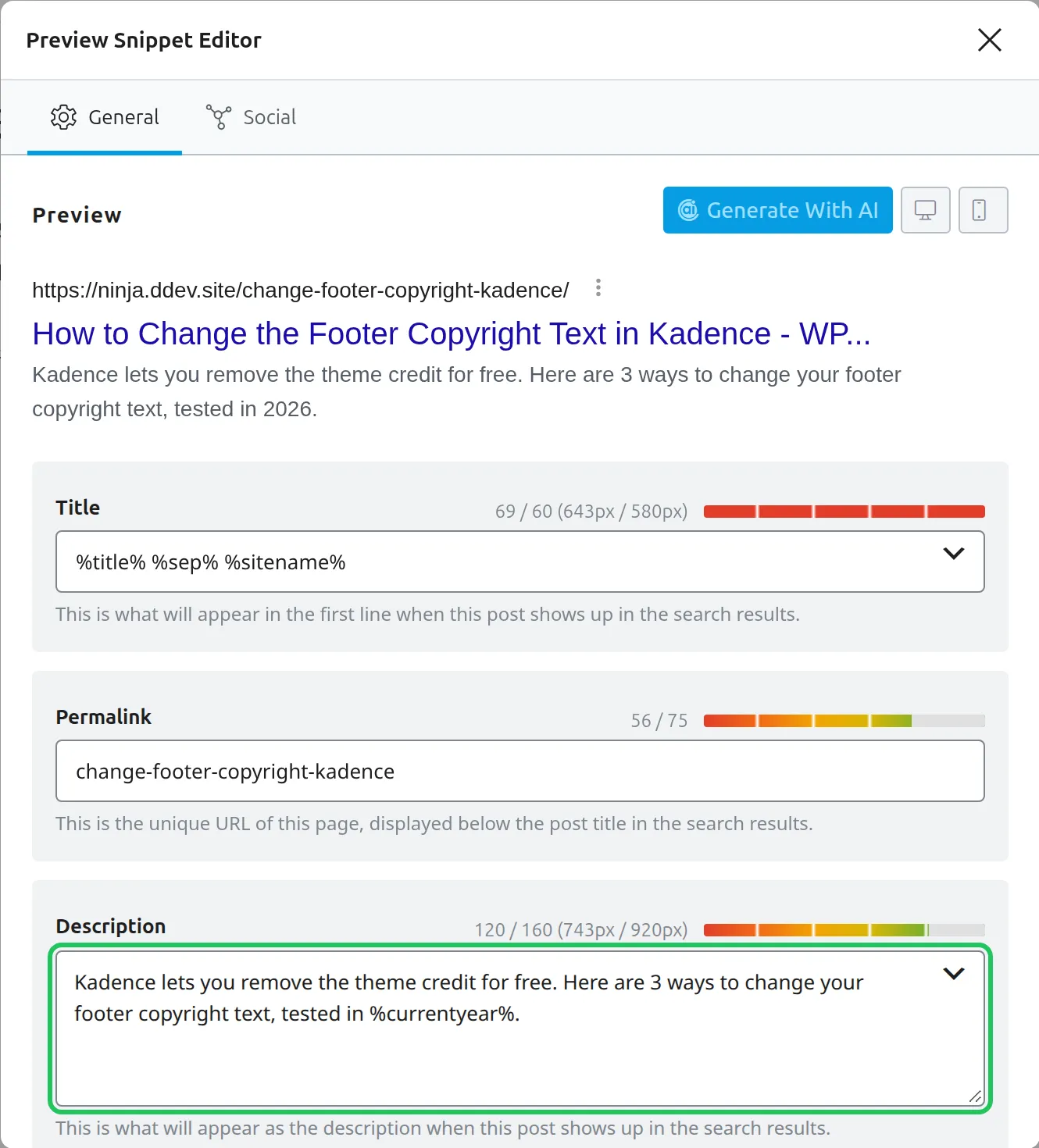
The preview at the top updates as you type, so you can see where it’ll be cut before you publish.
One catch I hit on my test site: Rank Math prints no SEO tags at all until you finish or skip its setup wizard. My typed description simply didn’t appear in the page’s code. Once I skipped the wizard (or you can connect a free Rank Math account), it showed up straight away. If your Rank Math description isn’t showing, check that first.
Yoast SEO
- Open your post or page.
- Scroll down to the Yoast SEO box below the editor.
- Open the Search appearance section.
- Type in the Meta description field, under the Google preview.
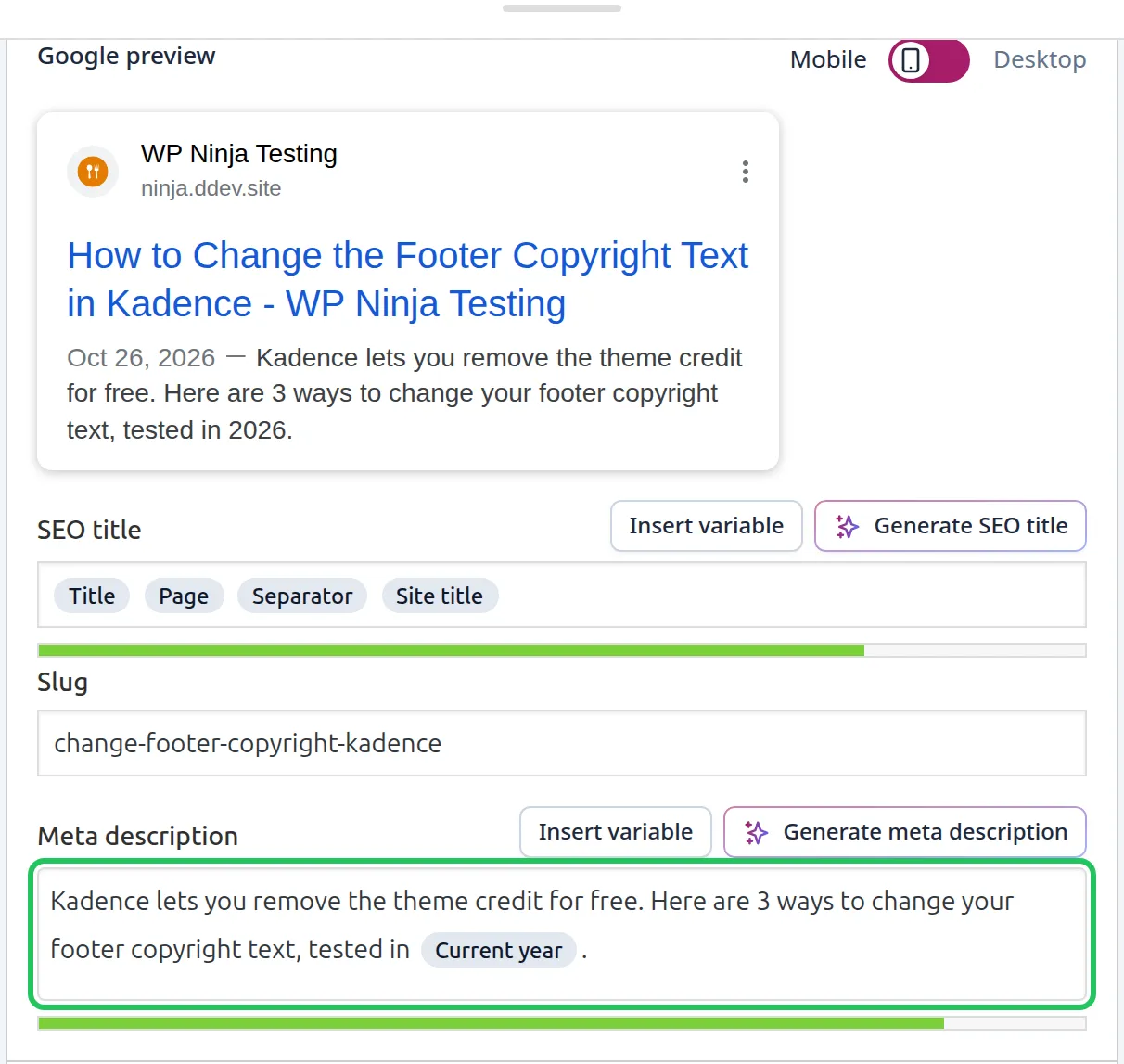
Older guides tell you to click “Edit snippet.” In Yoast 28.7 that button is gone, and the field sits right there in the box. Notice the preview, too: for blog posts Yoast puts the publish date in front of your description, which eats into the space you have.
SEO Simple Pack
- Open your post or page.
- Scroll down to the SEO SIMPLE PACK Settings box below the editor.
- Type in the Description of this page field.
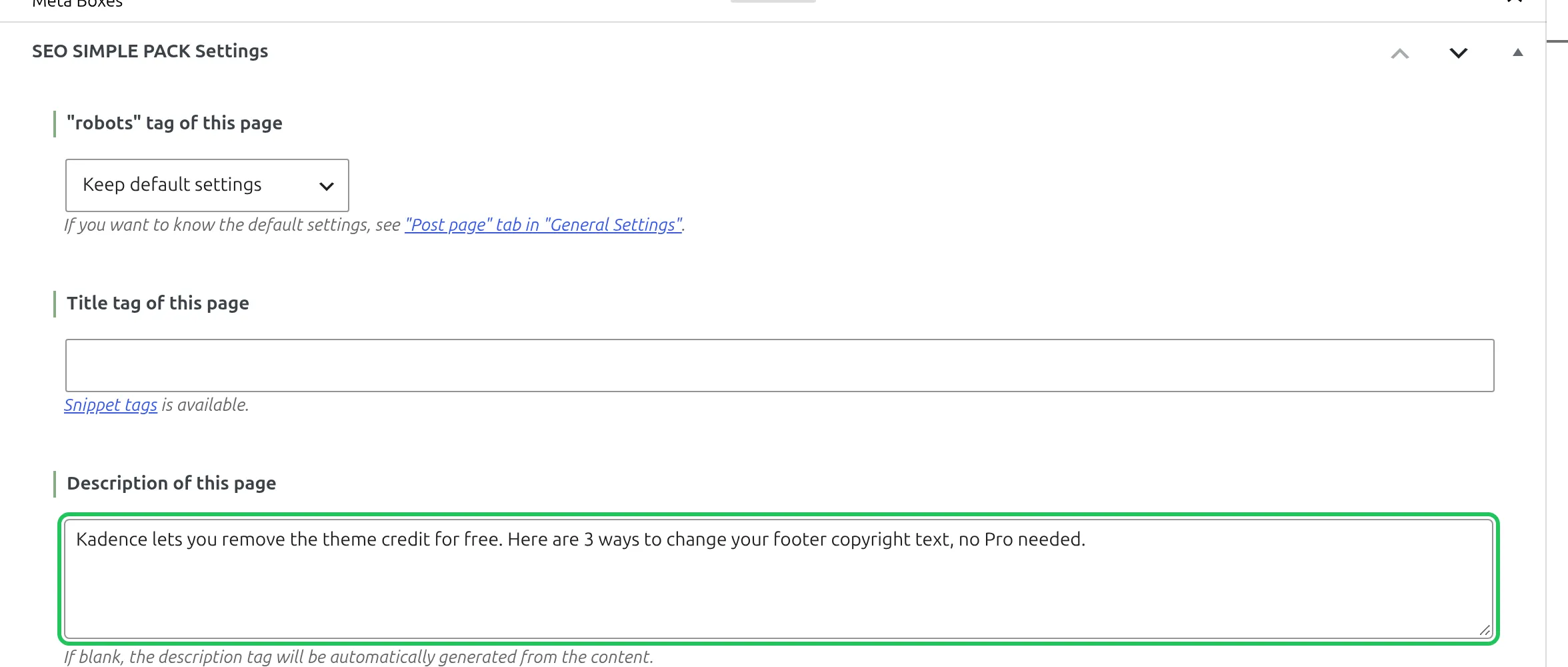
This is the plugin I run on this site. It’s lighter than the other 2, and there’s no preview or character counter, so check your length before you paste it in. I covered the rest of its settings in my SEO Simple Pack review.
No SEO Plugin Installed?
Then you don’t have a meta description at all, and Google writes every snippet for you. Install one. I compared Rank Math vs Yoast for beginners, and I tested 5 of them side by side for my roundup of the best free WordPress SEO plugins.
What Happens If You Leave the Meta Description Blank?
It depends on your plugin, and only 1 of the 3 I tested leaves it empty. I published a test post with no description and no excerpt, then checked what each plugin put in the page’s code:
| Setup | What the page gets when the field is blank |
|---|---|
| No SEO plugin | No meta description tag |
| Rank Math | Your excerpt if you wrote one; if not, the start of your post, trimmed at a word (157 characters on my test post) |
| Yoast SEO | No meta description tag (the excerpt is ignored) |
| SEO Simple Pack | The first 120 characters of your post, cut off wherever character 120 falls (the excerpt is ignored) |
SEO Simple Pack’s cut is the one to watch. On my test post it stopped mid-sentence:

None of this is a disaster. Google mostly writes its own snippet from your page anyway. But an auto-generated description that stops on a comma is a weaker pitch than one you wrote on purpose, and if your post opens with a story instead of the answer, that story becomes your description. Writing your own takes 2 minutes.
The Freshness Trick Most Guides Skip
Watch out for years in your descriptions.
If your description says “Best caching plugins for 2024” and someone searches in 2026, your result looks out of date, even if you updated the article last week. Searchers judge the snippet before they ever see your page.
Here’s how I handle it:
- If the description includes a year, put it on your update checklist. When you update the article, update the description in the same sitting.
- If the year isn’t essential, leave it out. “Best WordPress caching plugins compared” never goes stale.
- Use a year variable if your plugin has one. Rank Math has
%currentyear%and Yoast has%%currentyear%%. I tested both, and each printed 2026 on the live page. SEO Simple Pack doesn’t have a year variable.
One honest warning about that last tip: a year that updates itself makes a promise. Use it on pages you really do keep current, like a roundup you re-test every year. On an article you haven’t touched since 2024, “updated for 2026” is misleading, and readers notice when the content doesn’t match.
Does Google Always Use My Meta Description?
No. Google uses your page content to write the snippet by default, and it picks your meta description when it thinks yours describes the page better for that particular search.
How often does that happen? The 2 biggest studies I know of are both from 2020:
- Ahrefs checked 20,000 keywords on desktop and found Google rewrote the description 62.78% of the time. Long-tail searches were rewritten more often (65.62%) than short, popular ones (59.65%).
- Portent checked 30,000 keywords and found rewrites on 71% of mobile results and 68% on desktop. The higher a keyword’s search volume, the less likely the rewrite.
Google may have changed since then, so treat those numbers as a rough guide. The pattern is still useful. Your description gets used most for the main search you wrote it for, and Google pulls a sentence from your article for the long-tail questions it doesn’t cover.
My approach: write the description for your main target keyword, and accept that Google will improvise for the rest. That’s one more reason to answer the question near the top of your post, because those are the sentences Google borrows.
Meta Description Checklist
Before I publish any post, I check my meta description against this table:
| Rule | Why |
|---|---|
| About 120-155 characters, key point first | Snippets are cut to fit the screen width, so the start is what everyone sees |
| Answers the main search | Google is more likely to use a description that describes the page better than the page text does |
| Specific numbers or facts | Stands out from vague competitor descriptions |
| Has a benefit or outcome | Gives the searcher a reason to click |
| No filler phrases | “In this article” wastes characters and says nothing |
| Year is current (if mentioned) | Avoids looking outdated in search results |
| Doesn’t repeat the title | The title already shows above it, so use the description for new info |
| Unique to this page | Google says identical descriptions on every page aren’t helpful |
That second-to-last one is a common mistake. If your title says “How to Speed Up WordPress” and your description says “Learn how to speed up your WordPress site,” you’ve spent your description on something the searcher just read. Use it to add what the title doesn’t cover: the tool, the time it takes, the cost, or a surprising fact.
Common Mistakes to Avoid
Writing the Same Description for Every Post
Every page needs its own description. Google’s documentation says identical or similar descriptions on every page “aren’t helpful when individual pages appear in search results.”
Your homepage counts too. Google recommends a site-level description for the homepage and pages that list other posts, and page-specific descriptions everywhere else. Most SEO plugins let you set the homepage one in their general settings.
Starting With “This Article” or “This Post”
Searchers don’t care that it’s an article. They care about what they’ll learn. Compare these 2:
- “This article explains how to fix slow WordPress sites.” (passive, boring)
- “I cut my WordPress load time from 4.2s to 1.1s. Here’s exactly what I did.” (specific, engaging)
The second one answers an implied question, uses real numbers, and speaks in the first person. Just make sure your numbers are real, because the article has to back them up.
Forgetting About Your Existing Posts
If you’ve been blogging a while, your older posts probably have blank descriptions, which means your plugin is auto-filling them (or leaving them empty) as shown in the table above.
Set aside an hour and fix your top 20 posts first. To find them, open Google Search Console, go to Performance > Search results, and click the Pages tab. The pages with the most impressions are already being seen, so a better description there has the most to gain.
Frequently Asked Questions
Do meta descriptions affect SEO rankings?
No. Google said in 2009 that it doesn’t use the description meta tag in ranking, and that’s still the case. What a good description changes is whether people choose your result once it’s on the page.
What happens if I leave the meta description blank?
It depends on your SEO plugin. In my tests, Yoast and plain WordPress printed no description at all, Rank Math used your excerpt or the start of your post, and SEO Simple Pack used the first 120 characters of your post, even mid-sentence. In every case Google may still write its own snippet from your page.
Should I include my brand name in the meta description?
No. Google already shows your site name above the title link in the result. Adding it to your description spends 10-20 characters you could use for a benefit or a number.
How often should I update my meta descriptions?
Update the description whenever you update the article, especially if it mentions a year, a price or a version number. For evergreen posts with none of those, a good description can stay the same for years.
Does WordPress have a meta description by default?
No. A fresh WordPress 7.1.2 site prints no meta description tag, and the site tagline isn’t used as one. You need an SEO plugin like Rank Math, Yoast SEO or SEO Simple Pack to add the field.
Why is my meta description not showing in Google?
Usually because Google decided text from your page matched the search better, which happened for 63-71% of results in the 2020 studies. If it’s missing from your page’s code too, check your SEO plugin. Rank Math prints nothing until its setup wizard is finished or skipped.